








CRM strategy and operations

Ask five people in one company what a customer relationship management system does, and you will probably get five answers. The salesperson says it is where deals live. The support lead says it is the ticket history. The marketer says it is the contact list, and the finance director says it is another subscription. They are all right, which is exactly why CRM software is so often misunderstood and so often misbought.
This guide defines the category plainly, walks through what the software does day to day, separates the main types, and explains how to judge cost and return before you sign anything. It is written for owners, operations managers, and revenue leaders who need a clear picture rather than a vendor pitch.
A plain definition
CRM software is a database of people and organizations, joined to a record of everything your company has done with them. That means emails, calls, meetings, quotes, purchases, support requests, and notes. On top of that database sit tools that help staff act on the information: reminders, pipelines, reports, templates, and automated workflows.
The word “relationship” matters. A spreadsheet can hold names and phone numbers, but it cannot tell you that a colleague spoke to the buyer’s finance team last Tuesday, that a renewal is coming in ninety days, or that the contact just changed jobs. A CRM ties those facts together so that anyone who picks up the account starts informed.
What a CRM is not
It is not a magic lead generator. It will not fix a weak offer, and it will not make a disorganized sales process disciplined on its own. It is also not purely a sales tool anymore. Marketing, customer success, and service teams all draw on the same records in many companies.
The core building blocks
Nearly every product, from a free starter plan to an enterprise platform, is built from the same handful of parts. Knowing them makes vendor demos far easier to decode.
Contacts, accounts, and activity history
Contacts are individual people. Accounts, sometimes called companies or organizations, group those people. Activity history records what happened. When these three are clean and connected, everything else works better. When they are duplicated, outdated, or half-empty, even the most expensive system produces unreliable answers.
Deals and pipeline stages
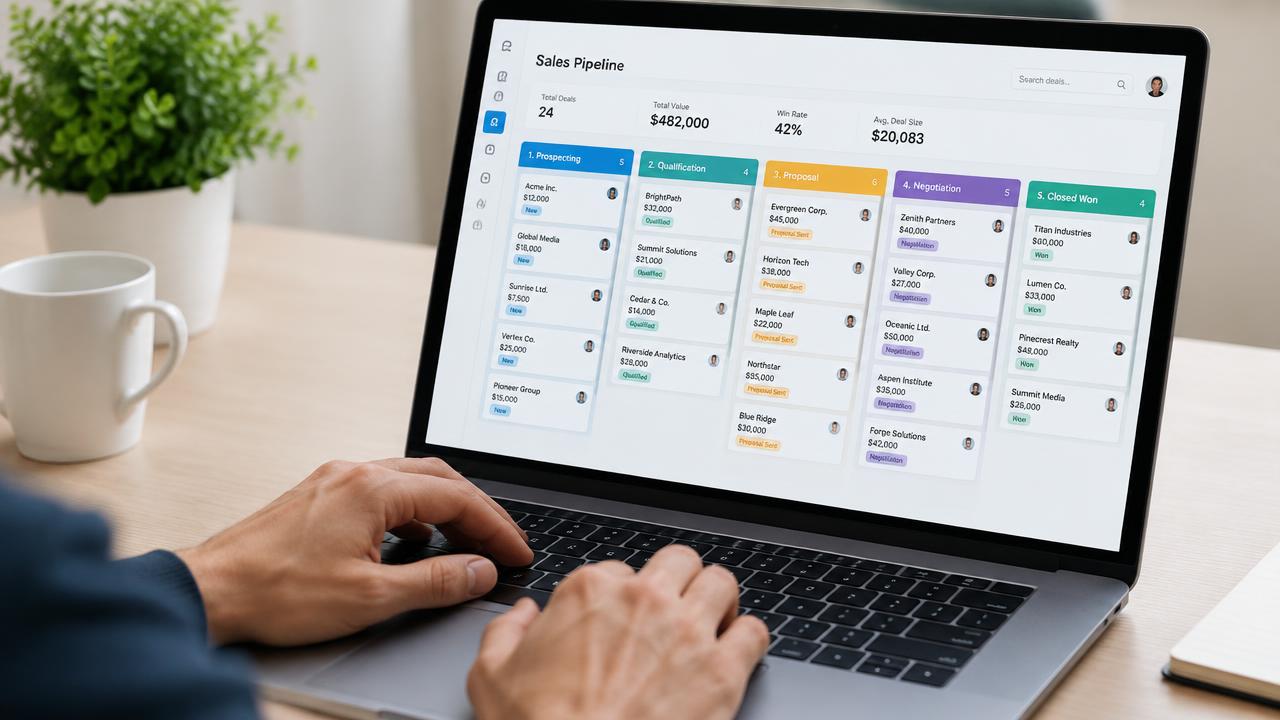
A deal, or opportunity, represents a potential sale. Deals move through stages such as qualified, proposal sent, negotiation, and closed. The visual board most people associate with CRM is simply deals sorted by stage. Its real purpose is forecasting: if you know how many deals sit at each stage and how often similar deals have closed in the past, you can estimate next quarter with some confidence.
Tasks, reminders, and calendars
Follow-up is where deals are won and lost. CRM software turns intentions into scheduled tasks that appear in a daily list. Calendar sync means meetings are logged without manual typing, which matters because manual entry is the first thing busy people abandon.
Reporting and dashboards
Reports answer questions such as which lead sources produce customers, how long deals take, and which reps need coaching. Good dashboards are short. A manager should be able to read the essentials in a couple of minutes.
Sales automation
Sales automation covers the repetitive steps around a deal: assigning new leads to a rep, sending a follow-up email template after a demo, creating a task when a deal stalls, or updating a field when a contract is signed. Done well, it removes administrative drag and standardizes the process. Done badly, it sends clumsy messages at the wrong moment, so start with internal automations such as task creation before automating anything customers see.
AD SLOT
The three traditional types of CRM
Analysts have long described three categories. Real products often blend them, but the labels still help.
| Type | Primary focus | Typical users | Example use |
|---|---|---|---|
| — | — | — | — |
| Operational | Streamlining sales, marketing, and service processes | Sales reps, service agents | Routing leads and logging every call |
| Analytical | Finding patterns in customer data | Analysts, revenue operations | Spotting which segments churn fastest |
| Collaborative | Sharing information across departments | Cross-functional teams | Support sees the open deal before replying |
Most buyers want operational capability first. Analytical depth becomes valuable as your data grows, and collaboration features matter most when several teams touch the same customer.
Cloud versus on-premise deployment
Today the large majority of new purchases are cloud-based, meaning the vendor hosts the software and you access it through a browser or app. You pay a recurring subscription, updates arrive automatically, and you do not maintain servers. On-premise systems, installed on your own infrastructure, still exist, mainly in regulated industries or organizations with strict data residency rules.
The tradeoffs are straightforward. Cloud deployment lowers upfront cost and speeds up setup, but you depend on the vendor for uptime and accept their release schedule. On-premise gives more control and customization, at the price of hardware, security staff, and slower upgrades. Unless a compliance requirement forces your hand, cloud is the sensible default for small and mid-sized companies.
What CRM software costs
Pricing varies widely, and published numbers change often, so treat any figure you read in an article as a rough guide and confirm with the vendor. Most products charge per user per month, with tiers that unlock more automation, reporting, and customization. Some offer a free plan with limited records or features. Enterprise contracts are usually negotiated, with annual commitments and add-on fees.
When comparing pricing, look beyond the headline seat price:
- Implementation and data migration, which may be a one-time service fee
- Add-ons such as advanced reporting, extra storage, or additional sandboxes
- Integration costs for your email, accounting, and support tools
- Training time, which is a real cost even when no invoice arrives
- Contract terms, including renewal increases and cancellation notice periods
A helpful rule of thumb is that the subscription is often only part of the first-year cost for a complex deployment. Budget for people and process, not only licenses.
AD SLOT
Measuring ROI without fooling yourself
Return on investment from CRM software is real but easy to overstate. Vendors like to cite large percentage improvements, and you should be skeptical of any single universal number, because results depend heavily on how well the system is adopted. Build your own case from your own baseline.
Pick a few measurable outcomes
Choose three or four things the system should change. Common candidates include shorter time to first response on new leads, higher win rate on qualified deals, fewer deals lost to missed follow-ups, and less time spent on manual reporting. Record where you stand now so that you can compare in six months.
Count the savings you can defend
Hours saved on admin work have value, but only if they are redirected to selling or service. Fewer lost renewals have a clear dollar figure. Be conservative. A modest, defensible ROI estimate is more useful than an impressive one nobody believes.
A CRM does not create discipline. It reveals whether you already have it.
How to evaluate vendors
Start with your process, not their feature list. Write down how a lead becomes a customer in your company, step by step, including the awkward exceptions. Then ask each vendor to demonstrate that exact flow using your terminology.
A short evaluation checklist
- Does the pipeline match how you actually sell, with customizable stages and fields?
- Can it connect to your email, calendar, accounting, and website forms without custom code?
- Is the mobile app usable for people in the field?
- Are permissions flexible enough to protect sensitive data?
- Can you export all your data if you leave?
- What does support look like, and is it included in the plan?
Request a trial with your real data, not the demo sample. Give two or three daily users the task of running a week of work in it. Their frustration or enthusiasm will tell you more than any scorecard.
Why many CRM projects disappoint
Failure is rarely about software. The common causes are unclear ownership, dirty imported data, too many required fields, and leadership that keeps running meetings from private spreadsheets. If managers do not use the CRM to review pipeline, representatives quickly conclude it is optional.
Keep the initial configuration lean. Require only the fields people truly need, and add more when the team asks for them. Assign one internal owner with the authority to make decisions. Hold pipeline reviews inside the system, so that updating records becomes the easiest way to look prepared.
Trends worth watching in 2026
Artificial intelligence features are now common across the market. Typical uses include drafting emails, summarizing call notes, suggesting next steps, and scoring leads. They can save time, but they depend on good underlying data and need human review, especially for anything customer-facing. Ask vendors what data the features use, where it is processed, and whether it is used to train models.
Other trends include tighter integration between CRM and billing, more built-in conversation channels such as messaging and chat, and growing attention to privacy. Regulations such as GDPR and various US state privacy laws affect how you store and use personal data, so confirm consent and deletion tools exist.
Frequently asked questions
Is a spreadsheet enough instead of CRM software?
For a handful of customers and one person selling, yes. Trouble starts when several people share contacts, when follow-ups slip, or when you need reliable forecasts. At that point a spreadsheet becomes a liability.
How long does it take to set up?
A simple small-business setup can take days. A multi-team or enterprise rollout with integrations and data cleanup typically takes months. The time is dominated by decisions and data, not installation.
Do I need a separate marketing tool?
Many CRM platforms include basic email marketing. Companies with complex campaigns often add a dedicated marketing automation product that connects to the CRM. Start with what is built in.
Is customer data in a cloud CRM safe?
Reputable vendors invest heavily in security, and many exceed what a small company could manage alone. Still, review certifications, encryption practices, and access controls, and enforce strong passwords and multifactor authentication on your side.
Can I switch CRMs later?
Yes, but migration takes effort. Keep your data tidy and confirm that you can export contacts, deals, and notes in standard formats before you commit.
Conclusion: start with the process, then pick the tool
CRM software is best understood as shared memory for your customer relationships, plus the machinery to act on that memory consistently. The category is broad, and the right product depends on how you sell, who needs access, and how much complexity you can support. Define your process, set measurable goals, test with real users, and read the full pricing terms. A modest system that people use daily will outperform an impressive one that sits idle.